Honeypot
A honeypot is a trap channel. iHorizon lets you set up a channel that no real member should ever post in, marked with a clear "do not send messages here" warning. Legitimate users read the warning and stay away, but spam bots and raiders that blindly post everywhere fall right into it. The moment someone writes in that channel, iHorizon reacts automatically with the action you chose, before the spam can spread to the rest of your server.
/honeypot config
Requires the Administrator permission
Only members with the Administrator permission, or members added to the protection allowlist, can use this command.
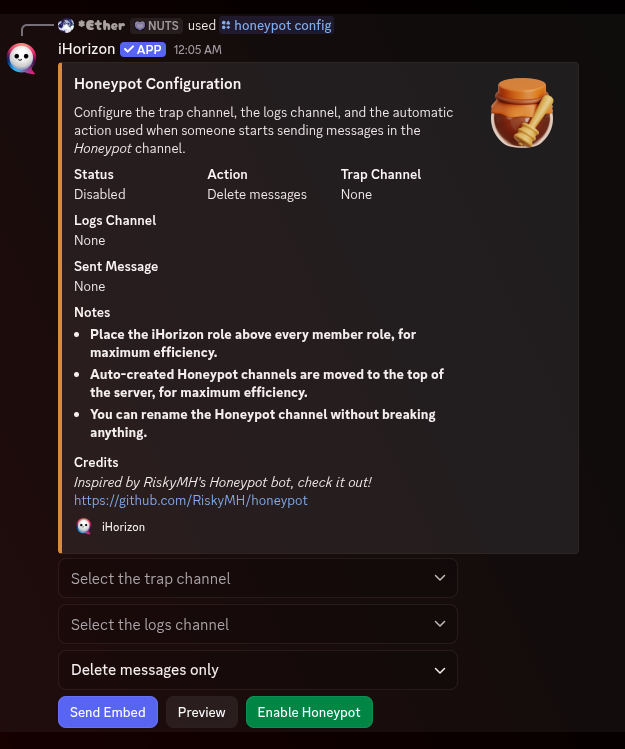
This command opens the Honeypot configuration panel, an interactive message with buttons and menus that walks you through the whole setup. From it you can:
- Choose the trap channel where the warning message lives, or let iHorizon create one for you.
- Choose the logs channel where iHorizon reports each member it catches.
- Pick the automatic action taken against anyone who posts in the trap: Kick users, Ban users, or Delete messages only. Whichever you choose, iHorizon always deletes the messages the trapped member recently sent across the server; kick and ban come on top of that cleanup.
- Enable or disable the whole system, and preview or send the warning message into the trap channel.
Moderators never trigger the trap
The honeypot ignores members holding the Administrator, Manage Server, Ban Members, or Kick Members permission. If you test it yourself as an admin, nothing will happen; use an unprivileged test account instead.
Get the most out of your honeypot
Place the iHorizon role above every member role so it always has the permissions needed to kick or ban a trapped user. Channels that iHorizon creates for you are automatically moved to the top of the server, where a raiding bot is most likely to post first. You can freely rename the honeypot channel without breaking anything.